

1/ Save the database :
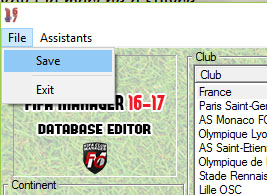
1a/=> FILE-> Save (top left button)
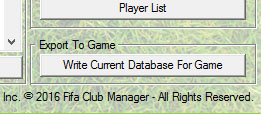
1b/=> Write Current Database For Games (bottom right button)
Then close the editor
2/ Start a new game :
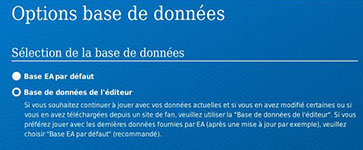 You must start a new game (administrator mode for VISTA / SEVEN users) and select "use the DATABASE EDITOR" in the startup screen to make the changes appear in the game . Tick the box "PLAY WITH THE FUTURE TRANSFER" to get the pre-programmed Mercato, made by us, is properly taken into account as well.
If despite this tutorial you are not able to install the database, PLEASE contact us here ici